|
Super Resolution for VirtualDub
|
|

free, 0.5 MB,
32 and 64 bits,
Requires VirtualDub 1.9.1 or higher.
|
|
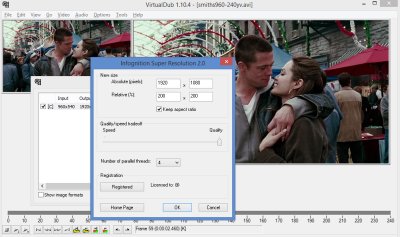
Infognition Super Resolution plugin for VirtualDub resizes video using
Super Resolution approach: by accumulating
information from previous frames it can provide much more details than any other resizing method.
Here are some examples of 4x upsizing with Super Resolution:
News
13 Dec 2013: version 2.0 released. Changes:
- Works 1.5 - 3 times faster than 1.0 (reaches real time in YV12 and fast mode).
- Slightly higher quality (+0.5 dB PSNR).
- Natively supports YV12, YUY2 as well as RGB24 and RGB32. The YUV modes work 1.5 times faster
than RGB, so when used as a first filter in a chain and decoding source video to YUV works
much faster than older version (~2 times faster).
- Adjustable parallelism, simpler quality settings.
See details in a blog post.
Installation
Just download the archive, unpack it and select superres32.vdf file if
you're using 32-bit version of VirtualDub, or superres64.vdf file if
you're using VeeDub64. Place that .vdf file to
/Program Files/VirtualDub/plugins/ or "plugins64" folder correspondingly.
Requirements
VirtualDub 1.9.1 or higher. Windows XP SP2 or higher (Vista, 7, 8, 10). CPU with SSE2 support
(virtually any CPU since 2001). Recommended: 4 cores or more to get HD video in real time.
Output resolution
The plugin can resize video to any desired width and height. However the SR engine upsizes video
exactly 2 times in both dimensions. If you set output size less than original size, SR is not used
and a high quality image interpolation method resizes the frames. When output size is the same as
input size, nothing is done at all. If new width, new height or both
is bigger than original value, SR engine upsizes video two times and then if new dimensions are not
exactly twice bigger than original ones, an image interpolation method is used to resize video from
200% to
desired width and height. Two consequences: upsizing to 200% is the fastest upsize mode. If you need
to want more than 200% the best quality is obtained by making a chain of two Super Resolution filters:
the first one upsizing to 200% and the other upsizing further.
Quality
We've compared this technology with different plugins for VirtualDub, Adobe After Effects and AviSynth
as well as several stand-alone applications like vReveal and CinemaHD.
See Video Resize Shootout.
This plugin shares the Super Resolution engine with Video Enhancer,
so in the comparison see the results of Video Enhancer.
That comparison demonstrates strong advantage of our super resolution implementation over all available
video resizing tools.
Frame order
The engine is suited for sequential processing, frame by frame. The more frames are processed
sequentially the more details are accumulated. When saving result to a file video is processed
from start to end in normal order and maximum quality is obtained. When seeking to random places
in preview mode, there is no good history of processed frames and accumulated information, so
the plugin takes 5 source frames (N-4 ... N) and processes them before showing you the result.
Visual results in preview mode when jumping to random frames can be worse than when rendering to a file.
Colorspace
Version 2.0 natively supports RGB24, RGB32, YUY2 and YV12 color modes. When working in other color
modes VirtualDub will convert automatically. Most videos decompress to some YUV modes and if you apply
this filter before any RGB-only filters (and don't force VD to work in RGB) then it will work
in YV12 or YUY2 which is substantially faster than RGB modes.
Speed
Because of high computational complexity of the technology Super Resolution plugin is not very
fast, but it's highly parallelized, providing a good speed boost on multicore and multiprocessor
systems. On a Quad Core 2.33 GHz PC upsizing 960x540 to 1920x1080 is done with 14-19 frames per second
depending on quality settings, and some lower resolutions get processed in real time or faster.
(Speed depends on image area, so 1280x720 is 2.25 times faster than 1920x1080).
Compatibility
Super Resolution plugin works in VirtualDub 1.9.1 and later versions. Older versions didn't support
necessary functionality to get previous frames. For the same reason it doesn't work in Video Enhancer
as a VD filter, and there's no sense in loading it in VE since the super resolution engine is already
built into Video Enhancer.
Trial limitations
Trial version is not limited by time or resolution. Unregistered version will draw a watermark
over the output video in a shape of diagonal stripes. Registered version doesn't draw any watermarks.
|
|
|
|